



D&R Legal Process Service, LLC.
Create Account / Log-in
At D&R Legal Process Service, we are committed to our client’s success. That’s why we provide professional service and ensure that the process is handled correctly at every step of the way. When you choose us to assist with your legal processing needs, it will be done right – each and every time.
Important Update — Effective June 1, 2026
After more than 40 years serving the San Francisco Bay Area and beyond, D&R Legal Process Service is officially joining Direct Legal Support, Inc. — a California legal support company established in 1961.
Beginning June 1, 2026, all new orders will be placed through the Direct Legal portal. Your service, quality, and the team you know and trust remain exactly the same — just a new home for your account.
Read the full notice emailed to clients →
Questions? Call us at (800) 675-5376 or visit directlegal.com.
Client Log-in
Log-in to your previously created Direct Legal Support account account here. Make sure to Bookmark this link so you can easily get back to your services.
The Process
3 Steps to
Create your account
-
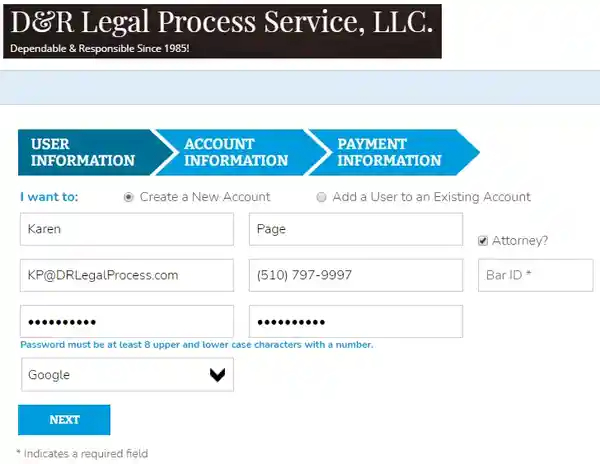
User
Information
- First Name
- Last Name
- Attorney? check box
- Email Address
- Phone Number
- Password
- Confirm Password
- How Did You Hear of Us?
- Next Button
-
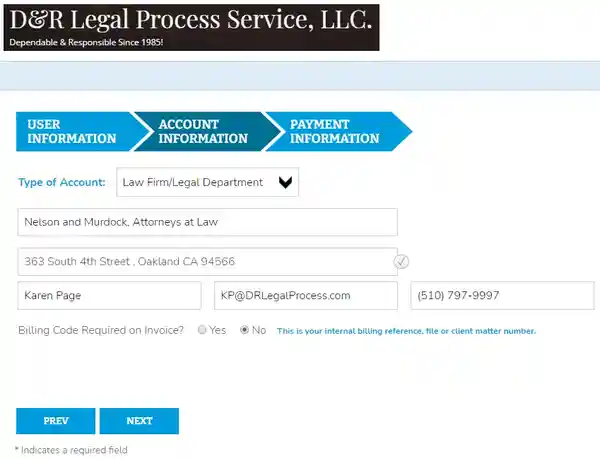
Account
Information
- Type of Account
- Account Name
- Address
- Primary Billing Name
- Primary Billing Email
- Primary Billing Phone
- Billing Code Required on Invoice
- Next Button
-
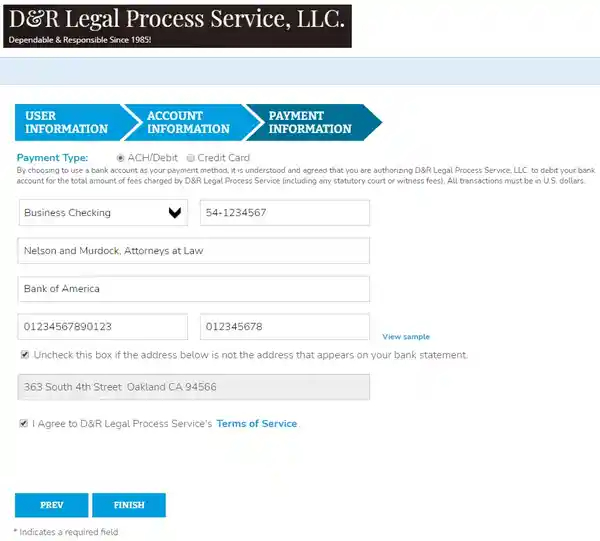
Payment
Information
- Payment Type: ACH/Debit OR Credit Card
If you choose ACH/Debit
- Business Checking OR Personal Checking
- Tax ID # OR If You Choose Personal Checking Drivers License Number and Then Drives License State
- Account Holder Name
- Bank Name
- Bank Account Number (Second Set of Numbers on Your Check)
- Bank Routing Number (First Set of Numbers on Your Check)
- Uncheck this Box if Address Below is Not the Address that Appears on Your Bank Statement
- Bank Statement Address
- I Agree to D&R Legal Process Service's Terms of Service check box
- Finish Button
- You will receive an Automatic Email to the address entered in Step One, User Information, within a few minutes of clicking the Finish Button
- Click the Link Inside to Activate Your Account. If you do not get the email, check your SPAM/JUNK Folders or your Email's Antivirus Quarantine Folder. Sometimes it will get cought there because it is an Automatric Email from [email protected]
- If you still do not find the email to activate your account, then please call Jason at 1-510-797-9996 and he can activate it from the office. You can also email us at [email protected]
If you choose Credit Card
- First Name
- Last Name
- Card #
- Security Code
- Expiration Month
- Expiration Year
- Uncheck this Box if Address Below is Not the Address that Appears on Your Credit Card Statement
- Credit Card Statement Address
- I Agree to D&R Legal Process Service's Terms of Service check box
- Finish Button
- You will receive an Automatic Email to the address entered in Step One, User Information, within a few minutes of clicking the Finish Button
- Click the Link Inside to Activate Your Account. If you do not get the email, check your SPAM/JUNK Folders or your Email's Antivirus Quarantine Folder. Sometimes it will get cought there because it is an Automatric Email from [email protected]
- If you still do not find the email to activate your account, then please call Jason at 1-510-797-9996 and he can activate it from the office. You can also email us at [email protected]
Ready to create your account now? Click Here!
D&R Legal Processing Services
Get in touch with us
-
39159 Paseo Padre Pkwy. #112, Fremont, CA 94538